k8s集群安装&nebulaGraph部署
一,集群环境准备
-
集群规划
#把xxx替换为对应的主机名 192.168.222.141 node1 192.168.222.142 node2 192.168.222.143 node3 -
配置静态ip
# vi /etc/sysconfig/network-scripts/ifcfg-enss3 #添加如下内容:所有集群都是 IPADDR="192.168.222.XXX" PREFIX="24" GATEWAY="192.168.222.x" DNS1="119.29.29.29" -
配置主机名
hostnamectl set-hostname xxx192.168.222.141 node1 192.168.222.142 node2 192.168.222.143 node3 -
配置ip_forward及过滤机制
# vim /etc/sysctl.conf net.ipv4.ip_forward = 1 net.bridge.bridge-nf-call-ip6tables = 1 net.bridge.bridge-nf-call-iptables = 1 -
modprobe br_netfilter -
sysctl -p /etc/sysctl.conf -
防火墙
# systemctl stop firewalld # systemctl disable firewalld -
selinux
永久关闭,一定要重启操作系统后生效。 sed -ri 's/SELINUX=enforcing/SELINUX=disabled/' /etc/selinux/config -
主机swap分区设置
sed -ri 's/.*swap.*/#&/' /etc/fstab -
时间同步
# yum -y install ntpdate
# crontab -e
0 */1 * * *  ntpdate time1.aliyun.com
二、Docker部署
所有主机均要配置
2.1 配置Docker YUM源
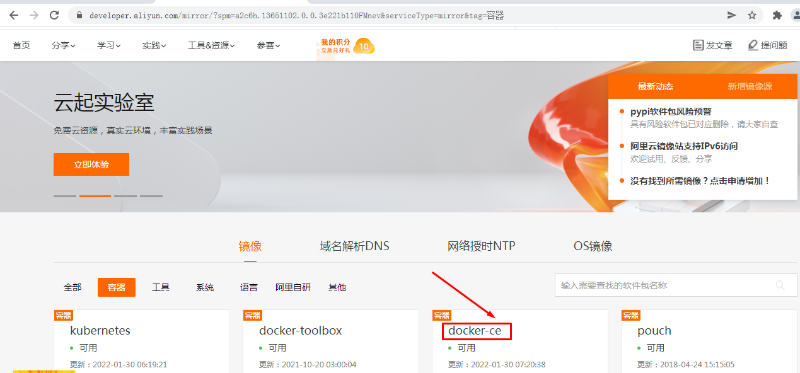
# wget -O /etc/yum.repos.d/docker-ce.repo https://mirrors.aliyun.com/docker-ce/linux/centos/docker-ce.repo
2.2 安装Docker CE
# yum install docker-ce-18.09.8-3.el7.x86_64 -y
2.3 启动Docker服务
# systemctl enable docker
# systemctl start docker
2.4 配置Docker容器镜像加速器
# vim /etc/docker/daemon.json
# cat /etc/docker/daemon.json
{
  "registry-mirrors": ["https://s27w6kze.mirror.aliyuncs.com"]
}
三、docker compose安装
# curl -L "https://github.com/docker/compose/releases/download/1.28.5/docker-compose-$(uname -s)-$(uname -m)" -o /usr/local/bin/docker-compose
# chmod +x /usr/local/bin/docker-compose
# ln -s /usr/local/bin/docker-compose /usr/bin/docker-compose
# docker-compose --version
四、添加rancher用户
使用CentOS时,不能使用 root 账号,因此要添加专用的账号进行 docker相关 操作。
所有集群主机均需要操作
# useradd rancher
# usermod -aG docker rancher
# echo 123 | passwd --stdin rancher
五、生成ssh证书用于部署集群
rke二进制文件安装主机上创建密钥,即为control主机,用于部署集群。
5.1 生成ssh证书
# ssh-keygen
5.2 复制证书到集群中所有主机
# 修改文件夹所属用户及所属组
chown -R rancher:rancher /home/rancher
# ssh-copy-id rancher@master01
# ssh-copy-id rancher@master02
# ssh-copy-id rancher@worker01
# ssh-copy-id rancher@worker02
# ssh-copy-id rancher@etcd01
5.3 验证ssh证书是否可用
本次在master01上部署rke二进制文件。
在rke二进制文件安装主机机测试连接其它集群主机,验证是否可使用docker ps命令即可。
# ssh rancher@主机名
远程主机# docker ps
六、rke工具下载
本次在master01上部署rke二进制文件。
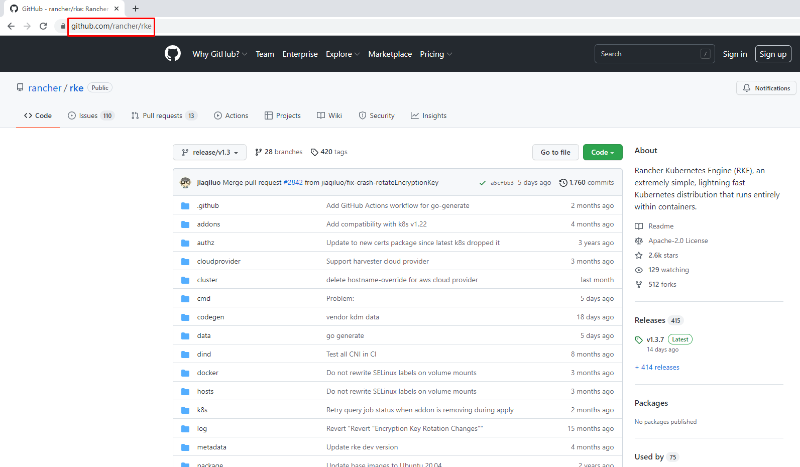
# wget https://github.com/rancher/rke/releases/download/v1.3.7/rke_linux-amd64
# mv rke_linux-amd64 /usr/local/bin/rke
# chmod +x /usr/local/bin/rke
# rke --version
rke version v1.3.7
七、初始化rke配置文件
# mkdir -p /app/rancher
# cd /app/rancher
# rke config --name cluster.yml
[+] Cluster Level SSH Private Key Path [~/.ssh/id_rsa]: 集群私钥路径
[+] Number of Hosts [1]: 3 集群中有3个节点
[+] SSH Address of host (1) [none]: 192.168.10.10 第一个节点IP地址
[+] SSH Port of host (1) [22]: 22 第一个节点SSH访问端口
[+] SSH Private Key Path of host (192.168.10.10) [none]: ~/.ssh/id_rsa 第一个节点私钥路径
[+] SSH User of host (192.168.10.10) [ubuntu]: rancher 远程用户名
[+] Is host (192.168.10.10) a Control Plane host (y/n)? [y]: y 是否为k8s集群控制节点
[+] Is host (192.168.10.10) a Worker host (y/n)? [n]: n 不是worker节点
[+] Is host (192.168.10.10) an etcd host (y/n)? [n]: n 不是etcd节点
[+] Override Hostname of host (192.168.10.10) [none]: 不覆盖现有主机名
[+] Internal IP of host (192.168.10.10) [none]: 主机局域网IP地址
[+] Docker socket path on host (192.168.10.10) [/var/run/docker.sock]: 主机上docker.sock路径
[+] SSH Address of host (2) [none]: 192.168.10.12 第二个节点
[+] SSH Port of host (2) [22]: 22 远程端口
[+] SSH Private Key Path of host (192.168.10.12) [none]: ~/.ssh/id_rsa 私钥路径
[+] SSH User of host (192.168.10.12) [ubuntu]: rancher 远程访问用户
[+] Is host (192.168.10.12) a Control Plane host (y/n)? [y]: n 不是控制节点
[+] Is host (192.168.10.12) a Worker host (y/n)? [n]: y 是worker节点
[+] Is host (192.168.10.12) an etcd host (y/n)? [n]: n 不是etcd节点
[+] Override Hostname of host (192.168.10.12) [none]: 不覆盖现有主机名
[+] Internal IP of host (192.168.10.12) [none]: 主机局域网IP地址
[+] Docker socket path on host (192.168.10.12) [/var/run/docker.sock]: 主机上docker.sock路径
[+] SSH Address of host (3) [none]: 192.168.10.14 第三个节点
[+] SSH Port of host (3) [22]: 22 远程端口
[+] SSH Private Key Path of host (192.168.10.14) [none]: ~/.ssh/id_rsa 私钥路径
[+] SSH User of host (192.168.10.14) [ubuntu]: rancher 远程访问用户
[+] Is host (192.168.10.14) a Control Plane host (y/n)? [y]: n 不是控制节点
[+] Is host (192.168.10.14) a Worker host (y/n)? [n]: n 不是worker节点
[+] Is host (192.168.10.14) an etcd host (y/n)? [n]: y 是etcd节点
[+] Override Hostname of host (192.168.10.14) [none]: 不覆盖现有主机名
[+] Internal IP of host (192.168.10.14) [none]: 主机局域网IP地址
[+] Docker socket path on host (192.168.10.14) [/var/run/docker.sock]: 主机上docker.sock路径
[+] Network Plugin Type (flannel, calico, weave, canal, aci) [canal]: 使用的网络插件
[+] Authentication Strategy [x509]: 认证策略
[+] Authorization Mode (rbac, none) [rbac]: 认证模式
[+] Kubernetes Docker image [rancher/hyperkube:v1.21.9-rancher1]: 集群容器镜像
[+] Cluster domain [cluster.local]: 集群域名
[+] Service Cluster IP Range [10.43.0.0/16]: 集群中Servic IP地址范围
[+] Enable PodSecurityPolicy [n]: 是否开启Pod安装策略
[+] Cluster Network CIDR [10.42.0.0/16]: 集群Pod网络
[+] Cluster DNS Service IP [10.43.0.10]: 集群DNS Service IP地址
[+] Add addon manifest URLs or YAML files [no]: 是否增加插件manifest URL或配置文件
[root@master01 rancher]# ls
cluster.yml
在cluster.yaml文件中
kube-controller:
image: ""
extra_args:
# 如果后面需要部署kubeflow或istio则一定要配置以下参数
cluster-signing-cert-file: "/etc/kubernetes/ssl/kube-ca.pem"
cluster-signing-key-file: "/etc/kubernetes/ssl/kube-ca-key.pem"
八、集群部署
# pwd
/app/rancher
# rke up
输出:
INFO[0000] Running RKE version: v1.3.7
INFO[0000] Initiating Kubernetes cluster
INFO[0000] [dialer] Setup tunnel for host [192.168.10.14]
INFO[0000] [dialer] Setup tunnel for host [192.168.10.10]
INFO[0000] [dialer] Setup tunnel for host [192.168.10.12]
INFO[0000] Checking if container [cluster-state-deployer] is running on host [192.168.10.14], try #1
INFO[0000] Checking if container [cluster-state-deployer] is running on host [192.168.10.10], try #1
INFO[0000] Checking if container [cluster-state-deployer] is running on host [192.168.10.12], try #1
INFO[0000] [certificates] Generating CA kubernetes certificates
INFO[0000] [certificates] Generating Kubernetes API server aggregation layer requestheader client CA certificates
INFO[0000] [certificates] GenerateServingCertificate is disabled, checking if there are unused kubelet certificates
INFO[0000] [certificates] Generating Kubernetes API server certificates
INFO[0000] [certificates] Generating Service account token key
INFO[0000] [certificates] Generating Kube Controller certificates
INFO[0000] [certificates] Generating Kube Scheduler certificates
INFO[0000] [certificates] Generating Kube Proxy certificates
INFO[0001] [certificates] Generating Node certificate
INFO[0001] [certificates] Generating admin certificates and kubeconfig
INFO[0001] [certificates] Generating Kubernetes API server proxy client certificates
INFO[0001] [certificates] Generating kube-etcd-192-168-10-14 certificate and key
INFO[0001] Successfully Deployed state file at [./cluster.rkestate]
INFO[0001] Building Kubernetes cluster
INFO[0001] [dialer] Setup tunnel for host [192.168.10.12]
INFO[0001] [dialer] Setup tunnel for host [192.168.10.14]
INFO[0001] [dialer] Setup tunnel for host [192.168.10.10]
INFO[0001] [network] Deploying port listener containers
INFO[0001] Image [rancher/rke-tools:v0.1.78] exists on host [192.168.10.14]
INFO[0001] Starting container [rke-etcd-port-listener] on host [192.168.10.14], try #1
INFO[0001] [network] Successfully started [rke-etcd-port-listener] container on host [192.168.10.14]
INFO[0001] Image [rancher/rke-tools:v0.1.78] exists on host [192.168.10.10]
INFO[0001] Starting container [rke-cp-port-listener] on host [192.168.10.10], try #1
INFO[0002] [network] Successfully started [rke-cp-port-listener] container on host [192.168.10.10]
INFO[0002] Image [rancher/rke-tools:v0.1.78] exists on host [192.168.10.12]
INFO[0002] Starting container [rke-worker-port-listener] on host [192.168.10.12], try #1
INFO[0002] [network] Successfully started [rke-worker-port-listener] container on host [192.168.10.12]
INFO[0002] [network] Port listener containers deployed successfully
INFO[0002] [network] Running control plane -> etcd port checks
INFO[0002] [network] Checking if host [192.168.10.10] can connect to host(s) [192.168.10.14] on port(s) [2379], try #1
INFO[0002] Image [rancher/rke-tools:v0.1.78] exists on host [192.168.10.10]
INFO[0002] Starting container [rke-port-checker] on host [192.168.10.10], try #1
INFO[0002] [network] Successfully started [rke-port-checker] container on host [192.168.10.10]
INFO[0002] Removing container [rke-port-checker] on host [192.168.10.10], try #1
INFO[0002] [network] Running control plane -> worker port checks
INFO[0002] [network] Checking if host [192.168.10.10] can connect to host(s) [192.168.10.12] on port(s) [10250], try #1
INFO[0002] Image [rancher/rke-tools:v0.1.78] exists on host [192.168.10.10]
INFO[0003] Starting container [rke-port-checker] on host [192.168.10.10], try #1
INFO[0003] [network] Successfully started [rke-port-checker] container on host [192.168.10.10]
INFO[0003] Removing container [rke-port-checker] on host [192.168.10.10], try #1
INFO[0003] [network] Running workers -> control plane port checks
INFO[0003] [network] Checking if host [192.168.10.12] can connect to host(s) [192.168.10.10] on port(s) [6443], try #1
INFO[0003] Image [rancher/rke-tools:v0.1.78] exists on host [192.168.10.12]
INFO[0003] Starting container [rke-port-checker] on host [192.168.10.12], try #1
INFO[0003] [network] Successfully started [rke-port-checker] container on host [192.168.10.12]
INFO[0003] Removing container [rke-port-checker] on host [192.168.10.12], try #1
INFO[0003] [network] Checking KubeAPI port Control Plane hosts
INFO[0003] [network] Removing port listener containers
INFO[0003] Removing container [rke-etcd-port-listener] on host [192.168.10.14], try #1
INFO[0003] [remove/rke-etcd-port-listener] Successfully removed container on host [192.168.10.14]
INFO[0003] Removing container [rke-cp-port-listener] on host [192.168.10.10], try #1
INFO[0003] [remove/rke-cp-port-listener] Successfully removed container on host [192.168.10.10]
INFO[0003] Removing container [rke-worker-port-listener] on host [192.168.10.12], try #1
INFO[0003] [remove/rke-worker-port-listener] Successfully removed container on host [192.168.10.12]
INFO[0003] [network] Port listener containers removed successfully
INFO[0003] [certificates] Deploying kubernetes certificates to Cluster nodes
INFO[0003] Checking if container [cert-deployer] is running on host [192.168.10.14], try #1
INFO[0003] Checking if container [cert-deployer] is running on host [192.168.10.10], try #1
INFO[0003] Checking if container [cert-deployer] is running on host [192.168.10.12], try #1
INFO[0003] Image [rancher/rke-tools:v0.1.78] exists on host [192.168.10.14]
INFO[0003] Image [rancher/rke-tools:v0.1.78] exists on host [192.168.10.12]
INFO[0003] Image [rancher/rke-tools:v0.1.78] exists on host [192.168.10.10]
INFO[0004] Starting container [cert-deployer] on host [192.168.10.14], try #1
INFO[0004] Starting container [cert-deployer] on host [192.168.10.12], try #1
INFO[0004] Starting container [cert-deployer] on host [192.168.10.10], try #1
INFO[0004] Checking if container [cert-deployer] is running on host [192.168.10.14], try #1
INFO[0004] Checking if container [cert-deployer] is running on host [192.168.10.12], try #1
INFO[0004] Checking if container [cert-deployer] is running on host [192.168.10.10], try #1
INFO[0009] Checking if container [cert-deployer] is running on host [192.168.10.14], try #1
INFO[0009] Removing container [cert-deployer] on host [192.168.10.14], try #1
INFO[0009] Checking if container [cert-deployer] is running on host [192.168.10.12], try #1
INFO[0009] Removing container [cert-deployer] on host [192.168.10.12], try #1
INFO[0009] Checking if container [cert-deployer] is running on host [192.168.10.10], try #1
INFO[0009] Removing container [cert-deployer] on host [192.168.10.10], try #1
INFO[0009] [reconcile] Rebuilding and updating local kube config
INFO[0009] Successfully Deployed local admin kubeconfig at [./kube_config_cluster.yml]
WARN[0009] [reconcile] host [192.168.10.10] is a control plane node without reachable Kubernetes API endpoint in the cluster
WARN[0009] [reconcile] no control plane node with reachable Kubernetes API endpoint in the cluster found
INFO[0009] [certificates] Successfully deployed kubernetes certificates to Cluster nodes
INFO[0009] [file-deploy] Deploying file [/etc/kubernetes/audit-policy.yaml] to node [192.168.10.10]
INFO[0009] Image [rancher/rke-tools:v0.1.78] exists on host [192.168.10.10]
INFO[0009] Starting container [file-deployer] on host [192.168.10.10], try #1
INFO[0009] Successfully started [file-deployer] container on host [192.168.10.10]
INFO[0009] Waiting for [file-deployer] container to exit on host [192.168.10.10]
INFO[0009] Waiting for [file-deployer] container to exit on host [192.168.10.10]
INFO[0009] Container [file-deployer] is still running on host [192.168.10.10]: stderr: [], stdout: []
INFO[0010] Waiting for [file-deployer] container to exit on host [192.168.10.10]
INFO[0010] Removing container [file-deployer] on host [192.168.10.10], try #1
INFO[0010] [remove/file-deployer] Successfully removed container on host [192.168.10.10]
INFO[0010] [/etc/kubernetes/audit-policy.yaml] Successfully deployed audit policy file to Cluster control nodes
INFO[0010] [reconcile] Reconciling cluster state
INFO[0010] [reconcile] This is newly generated cluster
INFO[0010] Pre-pulling kubernetes images
INFO[0010] Pulling image [rancher/hyperkube:v1.21.9-rancher1] on host [192.168.10.10], try #1
INFO[0010] Pulling image [rancher/hyperkube:v1.21.9-rancher1] on host [192.168.10.14], try #1
INFO[0010] Pulling image [rancher/hyperkube:v1.21.9-rancher1] on host [192.168.10.12], try #1
INFO[0087] Image [rancher/hyperkube:v1.21.9-rancher1] exists on host [192.168.10.10]
INFO[0090] Image [rancher/hyperkube:v1.21.9-rancher1] exists on host [192.168.10.12]
INFO[0092] Image [rancher/hyperkube:v1.21.9-rancher1] exists on host [192.168.10.14]
INFO[0092] Kubernetes images pulled successfully
INFO[0092] [etcd] Building up etcd plane..
INFO[0092] Image [rancher/rke-tools:v0.1.78] exists on host [192.168.10.14]
INFO[0092] Starting container [etcd-fix-perm] on host [192.168.10.14], try #1
INFO[0092] Successfully started [etcd-fix-perm] container on host [192.168.10.14]
INFO[0092] Waiting for [etcd-fix-perm] container to exit on host [192.168.10.14]
INFO[0092] Waiting for [etcd-fix-perm] container to exit on host [192.168.10.14]
INFO[0092] Container [etcd-fix-perm] is still running on host [192.168.10.14]: stderr: [], stdout: []
INFO[0093] Waiting for [etcd-fix-perm] container to exit on host [192.168.10.14]
INFO[0093] Removing container [etcd-fix-perm] on host [192.168.10.14], try #1
INFO[0093] [remove/etcd-fix-perm] Successfully removed container on host [192.168.10.14]
INFO[0093] Image [rancher/mirrored-coreos-etcd:v3.5.0] exists on host [192.168.10.14]
INFO[0093] Starting container [etcd] on host [192.168.10.14], try #1
INFO[0093] [etcd] Successfully started [etcd] container on host [192.168.10.14]
INFO[0093] [etcd] Running rolling snapshot container [etcd-snapshot-once] on host [192.168.10.14]
INFO[0093] Image [rancher/rke-tools:v0.1.78] exists on host [192.168.10.14]
INFO[0094] Starting container [etcd-rolling-snapshots] on host [192.168.10.14], try #1
INFO[0094] [etcd] Successfully started [etcd-rolling-snapshots] container on host [192.168.10.14]
INFO[0099] Image [rancher/rke-tools:v0.1.78] exists on host [192.168.10.14]
INFO[0099] Starting container [rke-bundle-cert] on host [192.168.10.14], try #1
INFO[0099] [certificates] Successfully started [rke-bundle-cert] container on host [192.168.10.14]
INFO[0099] Waiting for [rke-bundle-cert] container to exit on host [192.168.10.14]
INFO[0099] Container [rke-bundle-cert] is still running on host [192.168.10.14]: stderr: [], stdout: []
INFO[0100] Waiting for [rke-bundle-cert] container to exit on host [192.168.10.14]
INFO[0100] [certificates] successfully saved certificate bundle [/opt/rke/etcd-snapshots//pki.bundle.tar.gz] on host [192.168.10.14]
INFO[0100] Removing container [rke-bundle-cert] on host [192.168.10.14], try #1
INFO[0100] Image [rancher/rke-tools:v0.1.78] exists on host [192.168.10.14]
INFO[0100] Starting container [rke-log-linker] on host [192.168.10.14], try #1
INFO[0100] [etcd] Successfully started [rke-log-linker] container on host [192.168.10.14]
INFO[0100] Removing container [rke-log-linker] on host [192.168.10.14], try #1
INFO[0100] [remove/rke-log-linker] Successfully removed container on host [192.168.10.14]
INFO[0100] Image [rancher/rke-tools:v0.1.78] exists on host [192.168.10.14]
INFO[0101] Starting container [rke-log-linker] on host [192.168.10.14], try #1
INFO[0101] [etcd] Successfully started [rke-log-linker] container on host [192.168.10.14]
INFO[0101] Removing container [rke-log-linker] on host [192.168.10.14], try #1
INFO[0101] [remove/rke-log-linker] Successfully removed container on host [192.168.10.14]
INFO[0101] [etcd] Successfully started etcd plane.. Checking etcd cluster health
INFO[0101] [etcd] etcd host [192.168.10.14] reported healthy=true
INFO[0101] [controlplane] Building up Controller Plane..
INFO[0101] Checking if container [service-sidekick] is running on host [192.168.10.10], try #1
INFO[0101] Image [rancher/rke-tools:v0.1.78] exists on host [192.168.10.10]
INFO[0101] Image [rancher/hyperkube:v1.21.9-rancher1] exists on host [192.168.10.10]
INFO[0101] Starting container [kube-apiserver] on host [192.168.10.10], try #1
INFO[0101] [controlplane] Successfully started [kube-apiserver] container on host [192.168.10.10]
INFO[0101] [healthcheck] Start Healthcheck on service [kube-apiserver] on host [192.168.10.10]
INFO[0106] [healthcheck] service [kube-apiserver] on host [192.168.10.10] is healthy
INFO[0106] Image [rancher/rke-tools:v0.1.78] exists on host [192.168.10.10]
INFO[0107] Starting container [rke-log-linker] on host [192.168.10.10], try #1
INFO[0107] [controlplane] Successfully started [rke-log-linker] container on host [192.168.10.10]
INFO[0107] Removing container [rke-log-linker] on host [192.168.10.10], try #1
INFO[0107] [remove/rke-log-linker] Successfully removed container on host [192.168.10.10]
INFO[0107] Image [rancher/hyperkube:v1.21.9-rancher1] exists on host [192.168.10.10]
INFO[0107] Starting container [kube-controller-manager] on host [192.168.10.10], try #1
INFO[0107] [controlplane] Successfully started [kube-controller-manager] container on host [192.168.10.10]
INFO[0107] [healthcheck] Start Healthcheck on service [kube-controller-manager] on host [192.168.10.10]
INFO[0112] [healthcheck] service [kube-controller-manager] on host [192.168.10.10] is healthy
INFO[0112] Image [rancher/rke-tools:v0.1.78] exists on host [192.168.10.10]
INFO[0113] Starting container [rke-log-linker] on host [192.168.10.10], try #1
INFO[0113] [controlplane] Successfully started [rke-log-linker] container on host [192.168.10.10]
INFO[0113] Removing container [rke-log-linker] on host [192.168.10.10], try #1
INFO[0113] [remove/rke-log-linker] Successfully removed container on host [192.168.10.10]
INFO[0113] Image [rancher/hyperkube:v1.21.9-rancher1] exists on host [192.168.10.10]
INFO[0113] Starting container [kube-scheduler] on host [192.168.10.10], try #1
INFO[0113] [controlplane] Successfully started [kube-scheduler] container on host [192.168.10.10]
INFO[0113] [healthcheck] Start Healthcheck on service [kube-scheduler] on host [192.168.10.10]
INFO[0118] [healthcheck] service [kube-scheduler] on host [192.168.10.10] is healthy
INFO[0118] Image [rancher/rke-tools:v0.1.78] exists on host [192.168.10.10]
INFO[0119] Starting container [rke-log-linker] on host [192.168.10.10], try #1
INFO[0119] [controlplane] Successfully started [rke-log-linker] container on host [192.168.10.10]
INFO[0119] Removing container [rke-log-linker] on host [192.168.10.10], try #1
INFO[0119] [remove/rke-log-linker] Successfully removed container on host [192.168.10.10]
INFO[0119] [controlplane] Successfully started Controller Plane..
INFO[0119] [authz] Creating rke-job-deployer ServiceAccount
INFO[0119] [authz] rke-job-deployer ServiceAccount created successfully
INFO[0119] [authz] Creating system:node ClusterRoleBinding
INFO[0119] [authz] system:node ClusterRoleBinding created successfully
INFO[0119] [authz] Creating kube-apiserver proxy ClusterRole and ClusterRoleBinding
INFO[0119] [authz] kube-apiserver proxy ClusterRole and ClusterRoleBinding created successfully
INFO[0119] Successfully Deployed state file at [./cluster.rkestate]
INFO[0119] [state] Saving full cluster state to Kubernetes
INFO[0119] [state] Successfully Saved full cluster state to Kubernetes ConfigMap: full-cluster-state
INFO[0119] [worker] Building up Worker Plane..
INFO[0119] Checking if container [service-sidekick] is running on host [192.168.10.10], try #1
INFO[0119] Image [rancher/rke-tools:v0.1.78] exists on host [192.168.10.12]
INFO[0119] Image [rancher/rke-tools:v0.1.78] exists on host [192.168.10.14]
INFO[0119] [sidekick] Sidekick container already created on host [192.168.10.10]
INFO[0119] Image [rancher/hyperkube:v1.21.9-rancher1] exists on host [192.168.10.10]
INFO[0119] Starting container [kubelet] on host [192.168.10.10], try #1
INFO[0119] [worker] Successfully started [kubelet] container on host [192.168.10.10]
INFO[0119] [healthcheck] Start Healthcheck on service [kubelet] on host [192.168.10.10]
INFO[0119] Starting container [nginx-proxy] on host [192.168.10.14], try #1
INFO[0119] [worker] Successfully started [nginx-proxy] container on host [192.168.10.14]
INFO[0119] Image [rancher/rke-tools:v0.1.78] exists on host [192.168.10.14]
INFO[0119] Starting container [nginx-proxy] on host [192.168.10.12], try #1
INFO[0119] [worker] Successfully started [nginx-proxy] container on host [192.168.10.12]
INFO[0119] Image [rancher/rke-tools:v0.1.78] exists on host [192.168.10.12]
INFO[0119] Starting container [rke-log-linker] on host [192.168.10.14], try #1
INFO[0120] Starting container [rke-log-linker] on host [192.168.10.12], try #1
INFO[0120] [worker] Successfully started [rke-log-linker] container on host [192.168.10.14]
INFO[0120] Removing container [rke-log-linker] on host [192.168.10.14], try #1
INFO[0120] [remove/rke-log-linker] Successfully removed container on host [192.168.10.14]
INFO[0120] Checking if container [service-sidekick] is running on host [192.168.10.14], try #1
INFO[0120] Image [rancher/rke-tools:v0.1.78] exists on host [192.168.10.14]
INFO[0120] [worker] Successfully started [rke-log-linker] container on host [192.168.10.12]
INFO[0120] Removing container [rke-log-linker] on host [192.168.10.12], try #1
INFO[0120] Image [rancher/hyperkube:v1.21.9-rancher1] exists on host [192.168.10.14]
INFO[0120] [remove/rke-log-linker] Successfully removed container on host [192.168.10.12]
INFO[0120] Checking if container [service-sidekick] is running on host [192.168.10.12], try #1
INFO[0120] Image [rancher/rke-tools:v0.1.78] exists on host [192.168.10.12]
INFO[0120] Starting container [kubelet] on host [192.168.10.14], try #1
INFO[0120] [worker] Successfully started [kubelet] container on host [192.168.10.14]
INFO[0120] [healthcheck] Start Healthcheck on service [kubelet] on host [192.168.10.14]
INFO[0120] Image [rancher/hyperkube:v1.21.9-rancher1] exists on host [192.168.10.12]
INFO[0120] Starting container [kubelet] on host [192.168.10.12], try #1
INFO[0120] [worker] Successfully started [kubelet] container on host [192.168.10.12]
INFO[0120] [healthcheck] Start Healthcheck on service [kubelet] on host [192.168.10.12]
INFO[0124] [healthcheck] service [kubelet] on host [192.168.10.10] is healthy
INFO[0124] Image [rancher/rke-tools:v0.1.78] exists on host [192.168.10.10]
INFO[0124] Starting container [rke-log-linker] on host [192.168.10.10], try #1
INFO[0125] [worker] Successfully started [rke-log-linker] container on host [192.168.10.10]
INFO[0125] Removing container [rke-log-linker] on host [192.168.10.10], try #1
INFO[0125] [remove/rke-log-linker] Successfully removed container on host [192.168.10.10]
INFO[0125] Image [rancher/hyperkube:v1.21.9-rancher1] exists on host [192.168.10.10]
INFO[0125] Starting container [kube-proxy] on host [192.168.10.10], try #1
INFO[0125] [worker] Successfully started [kube-proxy] container on host [192.168.10.10]
INFO[0125] [healthcheck] Start Healthcheck on service [kube-proxy] on host [192.168.10.10]
INFO[0125] [healthcheck] service [kubelet] on host [192.168.10.14] is healthy
INFO[0125] Image [rancher/rke-tools:v0.1.78] exists on host [192.168.10.14]
INFO[0125] Starting container [rke-log-linker] on host [192.168.10.14], try #1
INFO[0125] [healthcheck] service [kubelet] on host [192.168.10.12] is healthy
INFO[0125] Image [rancher/rke-tools:v0.1.78] exists on host [192.168.10.12]
INFO[0125] [worker] Successfully started [rke-log-linker] container on host [192.168.10.14]
INFO[0125] Starting container [rke-log-linker] on host [192.168.10.12], try #1
INFO[0125] Removing container [rke-log-linker] on host [192.168.10.14], try #1
INFO[0126] [remove/rke-log-linker] Successfully removed container on host [192.168.10.14]
INFO[0126] Image [rancher/hyperkube:v1.21.9-rancher1] exists on host [192.168.10.14]
INFO[0126] Starting container [kube-proxy] on host [192.168.10.14], try #1
INFO[0126] [worker] Successfully started [rke-log-linker] container on host [192.168.10.12]
INFO[0126] Removing container [rke-log-linker] on host [192.168.10.12], try #1
INFO[0126] [worker] Successfully started [kube-proxy] container on host [192.168.10.14]
INFO[0126] [healthcheck] Start Healthcheck on service [kube-proxy] on host [192.168.10.14]
INFO[0126] [remove/rke-log-linker] Successfully removed container on host [192.168.10.12]
INFO[0126] Image [rancher/hyperkube:v1.21.9-rancher1] exists on host [192.168.10.12]
INFO[0126] Starting container [kube-proxy] on host [192.168.10.12], try #1
INFO[0126] [worker] Successfully started [kube-proxy] container on host [192.168.10.12]
INFO[0126] [healthcheck] Start Healthcheck on service [kube-proxy] on host [192.168.10.12]
INFO[0130] [healthcheck] service [kube-proxy] on host [192.168.10.10] is healthy
INFO[0130] Image [rancher/rke-tools:v0.1.78] exists on host [192.168.10.10]
INFO[0130] Starting container [rke-log-linker] on host [192.168.10.10], try #1
INFO[0130] [worker] Successfully started [rke-log-linker] container on host [192.168.10.10]
INFO[0130] Removing container [rke-log-linker] on host [192.168.10.10], try #1
INFO[0130] [remove/rke-log-linker] Successfully removed container on host [192.168.10.10]
INFO[0131] [healthcheck] service [kube-proxy] on host [192.168.10.14] is healthy
INFO[0131] Image [rancher/rke-tools:v0.1.78] exists on host [192.168.10.14]
INFO[0131] Starting container [rke-log-linker] on host [192.168.10.14], try #1
INFO[0131] [healthcheck] service [kube-proxy] on host [192.168.10.12] is healthy
INFO[0131] Image [rancher/rke-tools:v0.1.78] exists on host [192.168.10.12]
INFO[0131] [worker] Successfully started [rke-log-linker] container on host [192.168.10.14]
INFO[0131] Removing container [rke-log-linker] on host [192.168.10.14], try #1
INFO[0131] Starting container [rke-log-linker] on host [192.168.10.12], try #1
INFO[0131] [remove/rke-log-linker] Successfully removed container on host [192.168.10.14]
INFO[0131] [worker] Successfully started [rke-log-linker] container on host [192.168.10.12]
INFO[0131] Removing container [rke-log-linker] on host [192.168.10.12], try #1
INFO[0131] [remove/rke-log-linker] Successfully removed container on host [192.168.10.12]
INFO[0131] [worker] Successfully started Worker Plane..
INFO[0131] Image [rancher/rke-tools:v0.1.78] exists on host [192.168.10.12]
INFO[0131] Image [rancher/rke-tools:v0.1.78] exists on host [192.168.10.14]
INFO[0131] Image [rancher/rke-tools:v0.1.78] exists on host [192.168.10.10]
INFO[0132] Starting container [rke-log-cleaner] on host [192.168.10.14], try #1
INFO[0132] Starting container [rke-log-cleaner] on host [192.168.10.12], try #1
INFO[0132] Starting container [rke-log-cleaner] on host [192.168.10.10], try #1
INFO[0132] [cleanup] Successfully started [rke-log-cleaner] container on host [192.168.10.14]
INFO[0132] Removing container [rke-log-cleaner] on host [192.168.10.14], try #1
INFO[0132] [cleanup] Successfully started [rke-log-cleaner] container on host [192.168.10.12]
INFO[0132] Removing container [rke-log-cleaner] on host [192.168.10.12], try #1
INFO[0132] [cleanup] Successfully started [rke-log-cleaner] container on host [192.168.10.10]
INFO[0132] Removing container [rke-log-cleaner] on host [192.168.10.10], try #1
INFO[0132] [remove/rke-log-cleaner] Successfully removed container on host [192.168.10.14]
INFO[0132] [remove/rke-log-cleaner] Successfully removed container on host [192.168.10.12]
INFO[0132] [remove/rke-log-cleaner] Successfully removed container on host [192.168.10.10]
INFO[0132] [sync] Syncing nodes Labels and Taints
INFO[0132] [sync] Successfully synced nodes Labels and Taints
INFO[0132] [network] Setting up network plugin: canal
INFO[0132] [addons] Saving ConfigMap for addon rke-network-plugin to Kubernetes
INFO[0132] [addons] Successfully saved ConfigMap for addon rke-network-plugin to Kubernetes
INFO[0132] [addons] Executing deploy job rke-network-plugin
INFO[0137] [addons] Setting up coredns
INFO[0137] [addons] Saving ConfigMap for addon rke-coredns-addon to Kubernetes
INFO[0137] [addons] Successfully saved ConfigMap for addon rke-coredns-addon to Kubernetes
INFO[0137] [addons] Executing deploy job rke-coredns-addon
INFO[0142] [addons] CoreDNS deployed successfully
INFO[0142] [dns] DNS provider coredns deployed successfully
INFO[0142] [addons] Setting up Metrics Server
INFO[0142] [addons] Saving ConfigMap for addon rke-metrics-addon to Kubernetes
INFO[0142] [addons] Successfully saved ConfigMap for addon rke-metrics-addon to Kubernetes
INFO[0142] [addons] Executing deploy job rke-metrics-addon
INFO[0147] [addons] Metrics Server deployed successfully
INFO[0147] [ingress] Setting up nginx ingress controller
INFO[0147] [ingress] removing admission batch jobs if they exist
INFO[0147] [addons] Saving ConfigMap for addon rke-ingress-controller to Kubernetes
INFO[0147] [addons] Successfully saved ConfigMap for addon rke-ingress-controller to Kubernetes
INFO[0147] [addons] Executing deploy job rke-ingress-controller
INFO[0152] [ingress] removing default backend service and deployment if they exist
INFO[0152] [ingress] ingress controller nginx deployed successfully
INFO[0152] [addons] Setting up user addons
INFO[0152] [addons] no user addons defined
INFO[0152] Finished building Kubernetes cluster successfully
如果部署失败,报错:
WARN[0114] [etcd] host [xxxxxxx] failed to check etcd health: failed to get /health for host [xxxxxxx]: Get "https://xxxxxxxx:2379/health": remote error: tls: bad certificate FATA[0114] [etcd] Failed to bring up Etcd Plane: etcd cluster is unhealthy: hosts [xxxxxxxx] failed to report healthy. Check etcd container logs on each host for more information
所有节点执行(无法删除就重启机器):rm -rf /etc/kubernetes/ /var/lib/kubelet/ /var/lib/etcd/
九、安装kubectl客户端
在master01主机上操作。
9.1 kubectl客户端安装
# wget https://storage.googleapis.com/kubernetes-release/release/v1.21.9/bin/linux/amd64/kubectl
# chmod +x kubectl
# mv kubectl /usr/local/bin/kubectl
# kubectl version --client
Client Version: version.Info{Major:"1", Minor:"21", GitVersion:"v1.21.9", GitCommit:"f59f5c2fda36e4036b49ec027e556a15456108f0", GitTreeState:"clean", BuildDate:"2022-01-19T17:33:06Z", GoVersion:"go1.16.12", Compiler:"gc", Platform:"linux/amd64"}
9.2 kubectl客户端配置集群管理文件及应用验证
[root@master01 ~]# ls /app/rancher/
cluster.rkestate  cluster.yml  kube_config_cluster.yml
[root@master01 ~]# mkdir ./.kube
[root@master01 ~]# cp /app/rancher/kube_config_cluster.yml /root/.kube/config
[root@master01 ~]# kubectl get nodes
NAME            STATUS   ROLES          AGE     VERSION
192.168.10.10   Ready    controlplane   9m13s   v1.21.9
192.168.10.12   Ready    worker         9m12s   v1.21.9
192.168.10.14   Ready    etcd           9m12s   v1.21.9
[root@master01 ~]# kubectl get pods -n kube-system
NAME                                         READY   STATUS      RESTARTS   AGE
calico-kube-controllers-5685fbd9f7-gcwj7     1/1     Running     0          9m36s
canal-fz2bg                                  2/2     Running     0          9m36s
canal-qzw4n                                  2/2     Running     0          9m36s
canal-sstjn                                  2/2     Running     0          9m36s
coredns-8578b6dbdd-ftnf6                     1/1     Running     0          9m30s
coredns-autoscaler-f7b68ccb7-fzdgc           1/1     Running     0          9m30s
metrics-server-6bc7854fb5-kwppz              1/1     Running     0          9m25s
rke-coredns-addon-deploy-job--1-x56w2        0/1     Completed   0          9m31s
rke-ingress-controller-deploy-job--1-wzp2b   0/1     Completed   0          9m21s
rke-metrics-addon-deploy-job--1-ltlgn        0/1     Completed   0          9m26s
rke-network-plugin-deploy-job--1-nsbfn       0/1     Completed   0          9m41s
十、集群web管理 rancher
在master01运行
rancher控制面板主要方便用于控制k8s集群,查看集群状态,编辑集群等。
10.1,使用docker run启动一个rancher
# 注意映射端口改了
[root@master01 ~]# docker run -d --restart=unless-stopped --privileged --name rancher -p 1080:80 -p 1443:443 rancher/rancher:v2.5.9
[root@master01 ~]# docker ps
CONTAINER ID   IMAGE                                COMMAND                  CREATED          STATUS          PORTS                                                                      NAMES
0fd46ee77655   rancher/rancher:v2.5.9               "entrypoint.sh"          5 seconds ago    Up 3 seconds    0.0.0.0:80->80/tcp, :::80->80/tcp, 0.0.0.0:443->443/tcp, :::443->443/tcp   rancher
10.2 访问rancher【这里映射端口1080,1443】
[root@master01 ~]# ss -anput | grep ":1080"
tcp    LISTEN     0      128       *:1080                    *:*                   users:(("docker-proxy",pid=29564,fd=4))
tcp    LISTEN     0      128    [::]:1080                 [::]:*                   users:(("docker-proxy",pid=29570,fd=4))
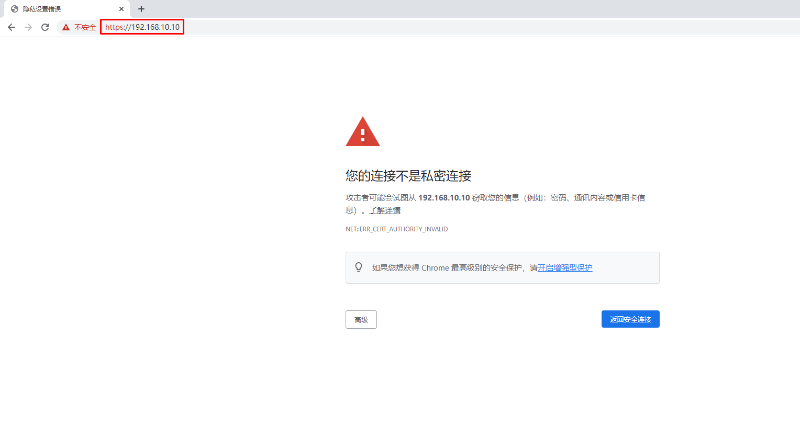
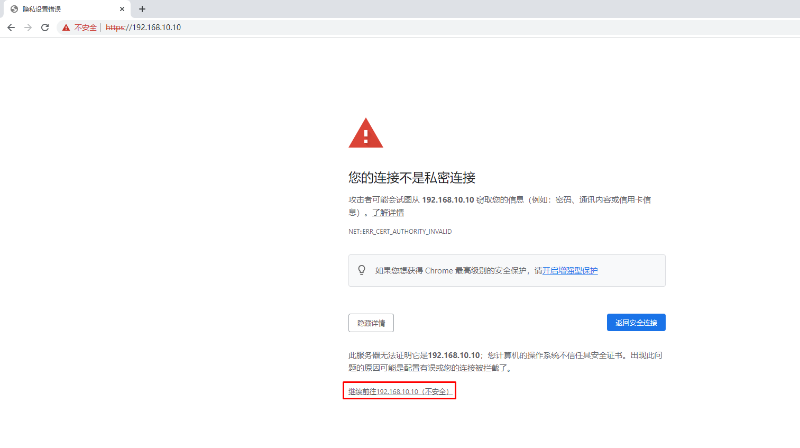
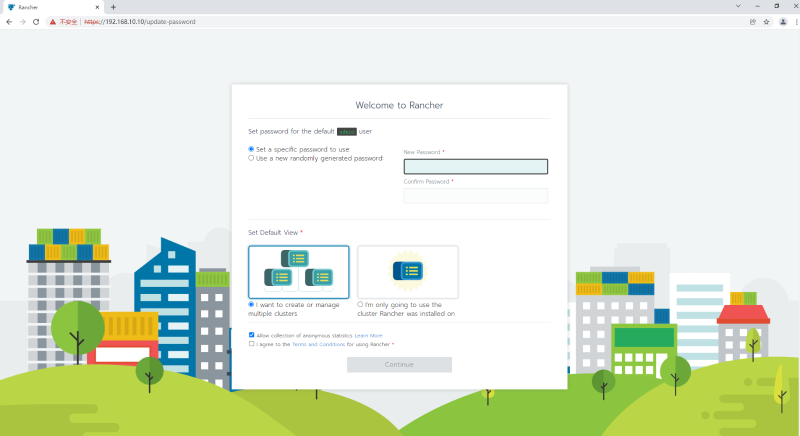
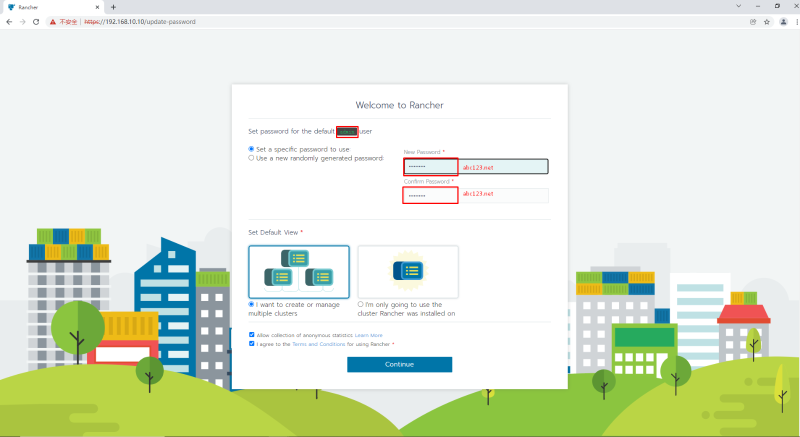
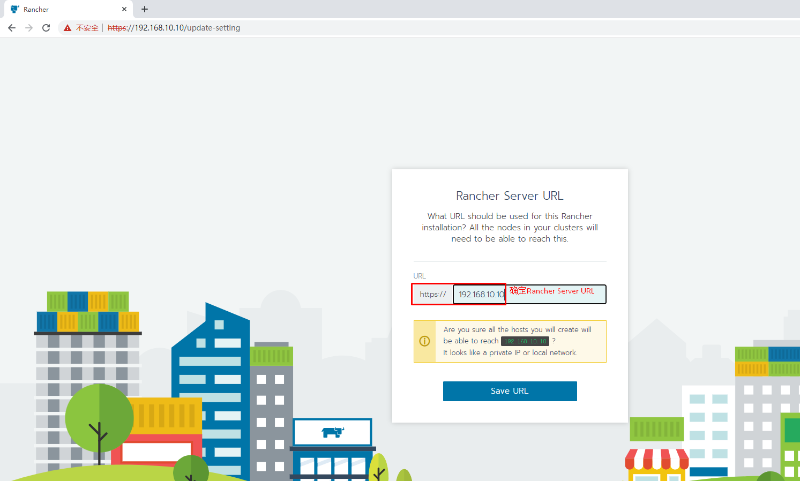
10.3 在rancher web界面添加kubernetes集群
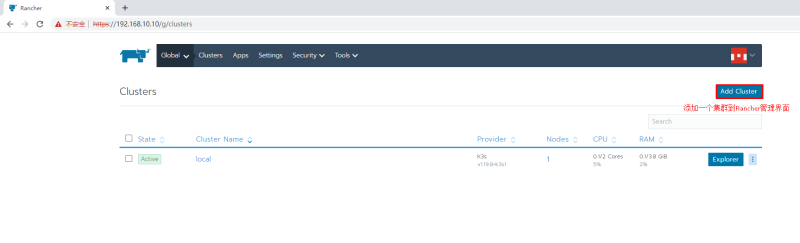
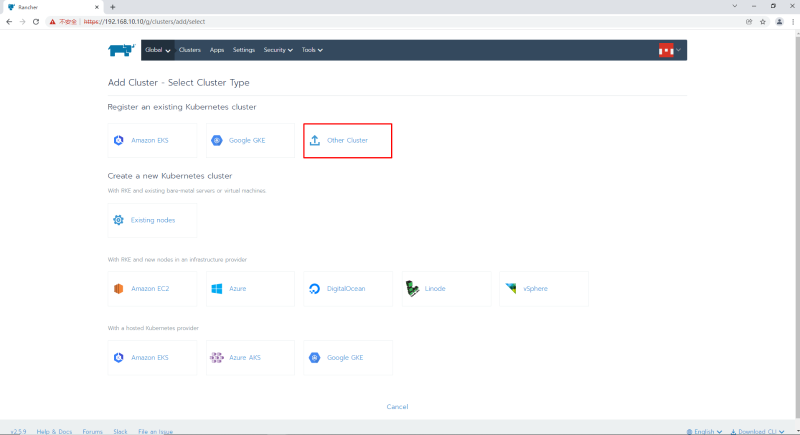
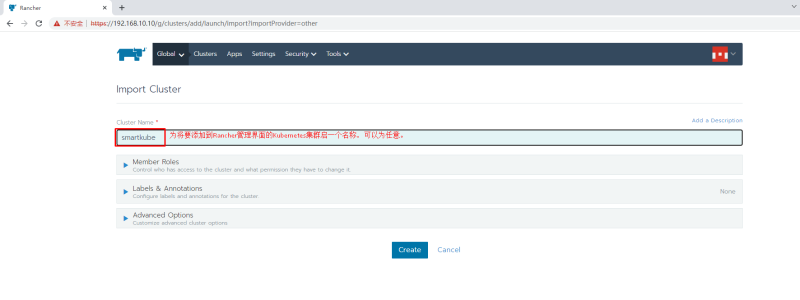
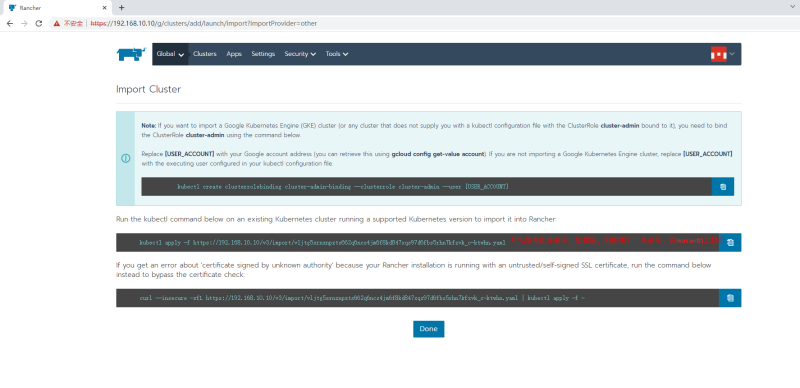
使用第一条报错:
[root@master01 ~]# kubectl apply -f https://192.168.10.10/v3/import/vljtg5srnznpzts662q6ncs4jm6f8kd847xqs97d6fbs5rhn7kfzvk_c-ktwhn.yaml
Unable to connect to the server: x509: certificate is valid for 127.0.0.1, 172.17.0.2, not 192.168.10.10
使用第二条:

第一次报错:
[root@master01 ~]# curl --insecure -sfL https://192.168.10.10/v3/import/vljtg5srnznpzts662q6ncs4jm6f8kd847xqs97d6fbs5rhn7kfzvk_c-ktwhn.yaml | kubectl apply -f -
error: no objects passed to apply


第二次成功:

[root@master01 ~]# curl --insecure -sfL https://192.168.10.10/v3/import/vljtg5srnznpzts662q6ncs4jm6f8kd847xqs97d6fbs5rhn7kfzvk_c-ktwhn.yaml | kubectl apply -f -
Warning: resource clusterroles/proxy-clusterrole-kubeapiserver is missing the kubectl.kubernetes.io/last-applied-configuration annotation which is required by kubectl apply. kubectl apply should only be used on resources created declaratively by either kubectl create --save-config or kubectl apply. The missing annotation will be patched automatically.
clusterrole.rbac.authorization.k8s.io/proxy-clusterrole-kubeapiserver configured
Warning: resource clusterrolebindings/proxy-role-binding-kubernetes-master is missing the kubectl.kubernetes.io/last-applied-configuration annotation which is required by kubectl apply. kubectl apply should only be used on resources created declaratively by either kubectl create --save-config or kubectl apply. The missing annotation will be patched automatically.
clusterrolebinding.rbac.authorization.k8s.io/proxy-role-binding-kubernetes-master configured
namespace/cattle-system created
serviceaccount/cattle created
clusterrolebinding.rbac.authorization.k8s.io/cattle-admin-binding created
secret/cattle-credentials-0619853 created
clusterrole.rbac.authorization.k8s.io/cattle-admin created
Warning: spec.template.spec.affinity.nodeAffinity.requiredDuringSchedulingIgnoredDuringExecution.nodeSelectorTerms[0].matchExpressions[0].key: beta.kubernetes.io/os is deprecated since v1.14; use "kubernetes.io/os" instead
deployment.apps/cattle-cluster-agent created
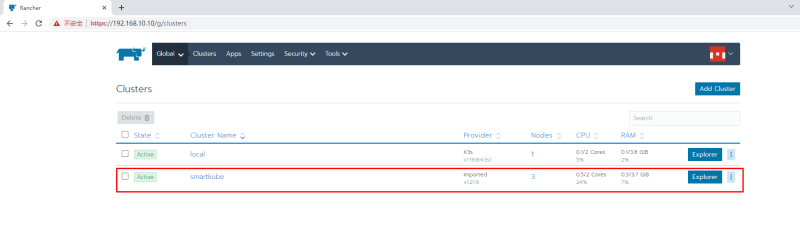
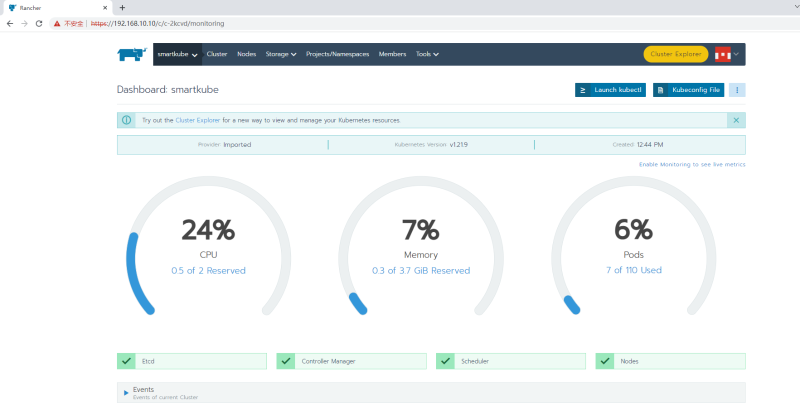
-
查看pod运行在那个节点
#查看podid
kubectl get pods -o wide
#进入pod
kubectl exec -it containerid  -- /bin/sh
十一,搭建nfs服务器
-
[root@nfsserver ~]# mkdir -p /data/nfs [root@nfsserver ~]# vim /etc/exports /data/nfs *(rw,no_root_squash,sync) -
所有节点中安装nfs客户端
yum install nfs-utils -y -
验证是否可用再工作节点中
showmount -e 192.168.222.143 #nfs服务器的地址
十二 使用NFS文件系统创建存储动态供给(storageclass安装)
PV对存储系统的支持可通过其插件来实现,目前,Kubernetes支持如下类型的插件。
PV对存储系统的支持可通过其插件来实现,目前,Kubernetes支持如下类型的插件。
官方地址:https://kubernetes.io/docs/concepts/storage/storage-classes/
官方插件是不支持NFS动态供给的,但是我们可以用第三方的插件来实现
第三方插件地址: https://github.com/kubernetes-retired/external-storage
12.1,下载并创建storageclass
[root@k8s-master1 ~]# wget https://raw.githubusercontent.com/kubernetes-sigs/nfs-subdir-external-provisioner/master/deploy/class.yaml

[root@k8s-master1 ~]# mv class.yaml storageclass-nfs.yml
[root@k8s-master1 ~]# cat storageclass-nfs.yml
apiVersion: storage.k8s.io/v1
kind: StorageClass				# 类型
metadata:
  name: nfs-client		# 名称,要使用就需要调用此名称
provisioner: k8s-sigs.io/nfs-subdir-external-provisioner 	# 动态供给插件
parameters:
  archiveOnDelete: "false"		# 删除数据时是否存档,false表示不存档,true表示存档
[root@k8s-master1 ~]# kubectl apply -f storageclass-nfs.yml
storageclass.storage.k8s.io/managed-nfs-storage created
[root@k8s-master1 ~]# kubectl get storageclass
NAME         PROVISIONER                                   RECLAIMPOLICY   VOLUMEBINDINGMODE   ALLOWVOLUMEEXPANSION   AGE
nfs-client   k8s-sigs.io/nfs-subdir-external-provisioner   Delete          Immediate           false                  10s

# RECLAIMPOLICY pv回收策略,pod或pvc被删除后,pv是否删除还是保留。
# VOLUMEBINDINGMODE Immediate 模式下PVC与PV立即绑定,主要是不等待相关Pod调度完成,不关心其运行节点,直接完成绑定。相反的 WaitForFirstConsumer模式下需要等待Pod调度完成后进行PV绑定。
# ALLOWVOLUMEEXPANSION pvc扩容
12.2,下载并创建rbac
因为storage自动创建pv需要经过kube-apiserver,所以需要授权。
[root@k8s-master1 ~]# wget https://raw.githubusercontent.com/kubernetes-sigs/nfs-subdir-external-provisioner/master/deploy/rbac.yaml

[root@k8s-master1 ~]# mv rbac.yaml storageclass-nfs-rbac.yaml
[root@k8s-master1 ~]# cat storageclass-nfs-rbac.yaml
apiVersion: v1
kind: ServiceAccount
metadata:
  name: nfs-client-provisioner
  # replace with namespace where provisioner is deployed
  namespace: default
---
kind: ClusterRole
apiVersion: rbac.authorization.k8s.io/v1
metadata:
  name: nfs-client-provisioner-runner
rules:
  - apiGroups: [""]
    resources: ["persistentvolumes"]
    verbs: ["get", "list", "watch", "create", "delete"]
  - apiGroups: [""]
    resources: ["persistentvolumeclaims"]
    verbs: ["get", "list", "watch", "update"]
  - apiGroups: ["storage.k8s.io"]
    resources: ["storageclasses"]
    verbs: ["get", "list", "watch"]
  - apiGroups: [""]
    resources: ["events"]
    verbs: ["create", "update", "patch"]
---
kind: ClusterRoleBinding
apiVersion: rbac.authorization.k8s.io/v1
metadata:
  name: run-nfs-client-provisioner
subjects:
  - kind: ServiceAccount
    name: nfs-client-provisioner
    # replace with namespace where provisioner is deployed
    namespace: default
roleRef:
  kind: ClusterRole
  name: nfs-client-provisioner-runner
  apiGroup: rbac.authorization.k8s.io
---
kind: Role
apiVersion: rbac.authorization.k8s.io/v1
metadata:
  name: leader-locking-nfs-client-provisioner
  # replace with namespace where provisioner is deployed
  namespace: default
rules:
  - apiGroups: [""]
    resources: ["endpoints"]
    verbs: ["get", "list", "watch", "create", "update", "patch"]
---
kind: RoleBinding
apiVersion: rbac.authorization.k8s.io/v1
metadata:
  name: leader-locking-nfs-client-provisioner
  # replace with namespace where provisioner is deployed
  namespace: default
subjects:
  - kind: ServiceAccount
    name: nfs-client-provisioner
    # replace with namespace where provisioner is deployed
    namespace: default
roleRef:
  kind: Role
  name: leader-locking-nfs-client-provisioner
  apiGroup: rbac.authorization.k8s.io
[root@k8s-master1 ~]# kubectl apply -f rbac.yaml
serviceaccount/nfs-client-provisioner created
clusterrole.rbac.authorization.k8s.io/nfs-client-provisioner-runner created
clusterrolebinding.rbac.authorization.k8s.io/run-nfs-client-provisioner created
role.rbac.authorization.k8s.io/leader-locking-nfs-client-provisioner created
rolebinding.rbac.authorization.k8s.io/leader-locking-nfs-client-provisioner created
12.3,创建动态供给的deployment
需要一个deployment来专门实现pv与pvc的自动创建
[root@k8s-master1 ~]# vim deploy-nfs-client-provisioner.yml
apiVersion: apps/v1
kind: Deployment
metadata:
  name: nfs-client-provisioner
spec:
  replicas: 1
  strategy:
    type: Recreate
  selector:
    matchLabels:
      app: nfs-client-provisioner
  template:
    metadata:
      labels:
        app: nfs-client-provisioner
    spec:
      serviceAccount: nfs-client-provisioner
      containers:
        - name: nfs-client-provisioner
          image: registry.cn-beijing.aliyuncs.com/pylixm/nfs-subdir-external-provisioner:v4.0.0
          volumeMounts:
            - name: nfs-client-root
              mountPath: /persistentvolumes
          env:
            - name: PROVISIONER_NAME
              value: k8s-sigs.io/nfs-subdir-external-provisioner
            - name: NFS_SERVER
              value: 192.168.10.129
            - name: NFS_PATH
              value: /data/nfs
      volumes:
        - name: nfs-client-root
          nfs:
            server: 192.168.10.129
            path: /data/nfs
[root@k8s-master1 ~]# kubectl apply -f deploy-nfs-client-provisioner.yml
deployment.apps/nfs-client-provisioner created
[root@k8s-master1 ~]# kubectl get pods |grep nfs-client-provisioner
nfs-client-provisioner-5b5ddcd6c8-b6zbq   1/1     Running   0          34s
十三,nebulaGraph operator 安装部署
-
参考官网 安装 NebulaGraph Operator 前,用户需要安装以下软件并确保安装版本的正确性(NebulaGraph Operator 不负责处理安装这些软件过程中出现的问题)。
软件 版本要求 Kubernetes >= 1.16 Helm >= 3.2.0 CoreDNS >= 1.6.0 -
Helm安装
[root@a ~]# curl https://raw.githubusercontent.com/helm/helm/master/scripts/get-helm-3 | bash % Total % Received % Xferd Average Speed Time Time Time Current Dload Upload Total Spent Left Speed 100 11345 100 11345 0 0 18830 0 --:--:-- --:--:-- --:--:-- 18845 [WARNING] Could not find git. It is required for plugin installation. Downloading https://get.helm.sh/helm-v3.12.1-linux-amd64.tar.gz Verifying checksum... Done. Preparing to install helm into /usr/local/bin helm installed into /usr/local/bin/helm -
coreDNS安装可以网上查阅资料(上面rke安装过程中已经安装了coredns)
-
安装 NebulaGraph Operator
-
添加 NebulaGraph Operator Helm 仓库。
helm repo add nebula-operator https://vesoft-inc.github.io/nebula-operator/charts -
拉取最新的 Operator Helm 仓库。
helm repo update参考 Helm 仓库获取更多
helm repo相关信息。 -
创建命名空间用于安装 NebulaGraph Operator。
kubectl create namespace <namespace_name>例如,创建operator命名空间。
kubectl create namespace operator- nebula-operator chart 中的所有资源都会安装在该命名空间下。
- 用户也可创建其他命名空间。
-
安装 NebulaGraph Operator。
helm install nebula-operator nebula-operator/nebula-operator --namespace=<namespace_name> --version=${chart_version}# 目前1.5.0无法安装 可以不指定版本 默认安装最新版本,由于gcr.io无法下载镜像使用kubesphere/kube-rbac-proxy:v0.8.0代替 helm install nebula-operator nebula-operator/nebula-operator --namespace=nebula-operator-system --set image.kubeRBACProxy.image=kubesphere/kube-rbac-proxy:v0.8.0
-
卸载 NebulaGraph Operator
-
卸载 NebulaGraph Operator chart。
helm uninstall nebula-operator --namespace=operator -
删除 CRD。
kubectl delete crd nebulaclusters.apps.nebula-graph.io
-
十四,部署nebulaGraph(kubectl)
- 创建集群配置文件。
创建名为apps_v1alpha1_nebulacluster.yaml的文件。官网提供了模板可以直接下载
apiVersion: apps.nebula-graph.io/v1alpha1
kind: NebulaCluster
metadata:
  name: nebula
spec:
  graphd:
    resources:
      requests:
        cpu: "500m"
        memory: "500Mi"
      limits:
        cpu: "1"
        memory: "1Gi"
    replicas: 1
    image: vesoft/nebula-graphd
    version: v3.5.0
    service:
      type: NodePort
      externalTrafficPolicy: Local
    logVolumeClaim:
      resources:
        requests:
          storage: 1Gi
      storageClassName: managed-nfs-storage
  metad:
#    license:
#      secretName: "nebula-license"
#      licenseKey: "nebula.license"
    resources:
      requests:
        cpu: "500m"
        memory: "500Mi"
      limits:
        cpu: "1"
        memory: "1Gi"
    replicas: 1
    image: vesoft/nebula-metad
    version: v3.5.0
    dataVolumeClaim:
      resources:
        requests:
          storage: 5Gi
      storageClassName:  managed-nfs-storage
    logVolumeClaim:
      resources:
        requests:
          storage: 1Gi
      storageClassName:  managed-nfs-storage
  storaged:
    resources:
      requests:
        cpu: "500m"
        memory: "500Mi"
      limits:
        cpu: "1"
注意:所有的storageClassName需要和上面安装storageclass时名称相同。 即 storageclass-nfs.yml中的 metadata.name: nfs-client
-
查看状态
nebula-exporter-66457984-w6zpn            1/1     Running   0          31m
nebula-graphd-0                           2/2     Running   0          31m
nebula-metad-0                            2/2     Running   0          35m
nebula-storaged-0                         2/2     Running   0          35m
nebula-storaged-1                         0/2     Pending   0          35m
nebula-storaged-2                         0/2     Pending   0          35m
nfs-client-provisioner-6bd7f48698-m4v94   1/1     Running   0          57m
十五,连接nebula
-
按照官网提供的模板修改
apiVersion: v1 kind: Service metadata: labels: # modify the cluster name app.kubernetes.io/cluster: "nebula" app.kubernetes.io/component: graphd app.kubernetes.io/managed-by: nebula-operator app.kubernetes.io/name: nebula-graph name: nebula-graphd-nodeport-svc namespace: default spec: externalTrafficPolicy: Cluster #改为local,无法连接到数据库,这里改为Cluster ports: - name: thrift port: 9669 protocol: TCP targetPort: 9669 - name: http port: 19669 protocol: TCP targetPort: 19669 selector: # modify the cluster name app.kubernetes.io/cluster: "nebula" app.kubernetes.io/component: graphd app.kubernetes.io/managed-by: nebula-operator app.kubernetes.io/name: nebula-graph type: NodePort -
执行以下命令使 Service 服务在集群中生效。
kubectl create -f graphd-nodeport-service.yaml
- 查看 Service 中NebulaGraph映射至集群节点的端口。
kubectl get services -l app.kubernetes.io/cluster=<nebula> #<nebula>为变量值,请用实际集群名称替换。
- 返回:
NAME                           TYPE        CLUSTER-IP     EXTERNAL-IP   PORT(S)                                          AGE
nebula-graphd-svc-nodeport     NodePort    10.107.153.129 <none>        9669:32236/TCP,19669:31674/TCP,19670:31057/TCP   24h
...
NodePort类型的 Service 中,映射至集群节点的端口为32236。
-
使用节点 IP 和上述映射的节点端口连接 NebulaGraph。
kubectl run -ti --image vesoft/nebula-console:v3.5.0 --restart=Never -- <nebula_console_name> -addr <node_ip> -port <node_port> -u <username> -p <password>示例如下:
kubectl run -ti --image vesoft/nebula-console:v3.5.0 --restart=Never -- nebula-console -addr 192.168.8.24 -port 32236 -u root -p vesoft If you don't see a command prompt, try pressing enter. (root@nebula) [(none)]>--image:为连接NebulaGraph的工具 NebulaGraph Console 的镜像。<nebula-console>:自定义的 Pod 名称。本示例为nebula-console。-addr:NebulaGraph集群中任一节点 IP 地址。本示例为192.168.8.24。-port:NebulaGraph映射至节点的端口。本示例为32236。-u:NebulaGraph账号的用户名。未启用身份认证时,可以使用任意已存在的用户名(默认为 root)。-p:用户名对应的密码。未启用身份认证时,密码可以填写任意字符。
注意:本文归作者所有,未经作者允许,不得转载